Coding agents write fast. rota makes sure what they merge works.
Capture work as issues. rota hands them to Claude Code, Codex or OpenCode, reviews every branch and merges only what passes your tests, one issue at a time or a round in parallel. Lessons and decisions stay in the repo, so the next session starts ahead.
Paste into your coding agent
Install rota and set it up in this project. Follow https://raw.githubusercontent.com/l4ci/rota/main/install.md
or in a terminal: brew install l4ci/tap/rota, or the install script, a release binary or the Claude Code plugin
See how rota compares to GSD, Superpowers, OpenSpec, ralph, Conductor, Orca, Vibe Kanban, Claude Squad, Gas Town, Octo and a bare Claude Code session.
main. Sample project.One agent, one item
You stay in the conversation. You need git and Claude Code or Codex, and nothing else.
-
/rota-captureWrite it down
Turn a brain dump into backlog items or issues. Mixed input, one line or a page.
-
/rota-workBuild it
Picks the next item, plans it, and builds it in small commits on its own branch.
-
/rota-shipReview, then merge
Reviews the branch, then opens a PR or merges.
/rota-ship --undorolls a cycle back.
Getting started walks the loop end to end, with what each rota setup question decides.
A round: several agents in parallel
When you have a few independent issues, a round runs them side by side. You stay available for product questions.
- Orchestrator
- One agent that picks the next issues, hands them out, answers workers' questions and merges. It asks you only for product decisions.
- Workers
- Agents that each take one issue in their own git worktree and terminal tab, build it and open a PR. They never merge.
- Gate
- The only merge path. It checks the PR is current and signed off, merges it, then runs your full test suite on the merged
main. A red result stops the round until it's fixed.
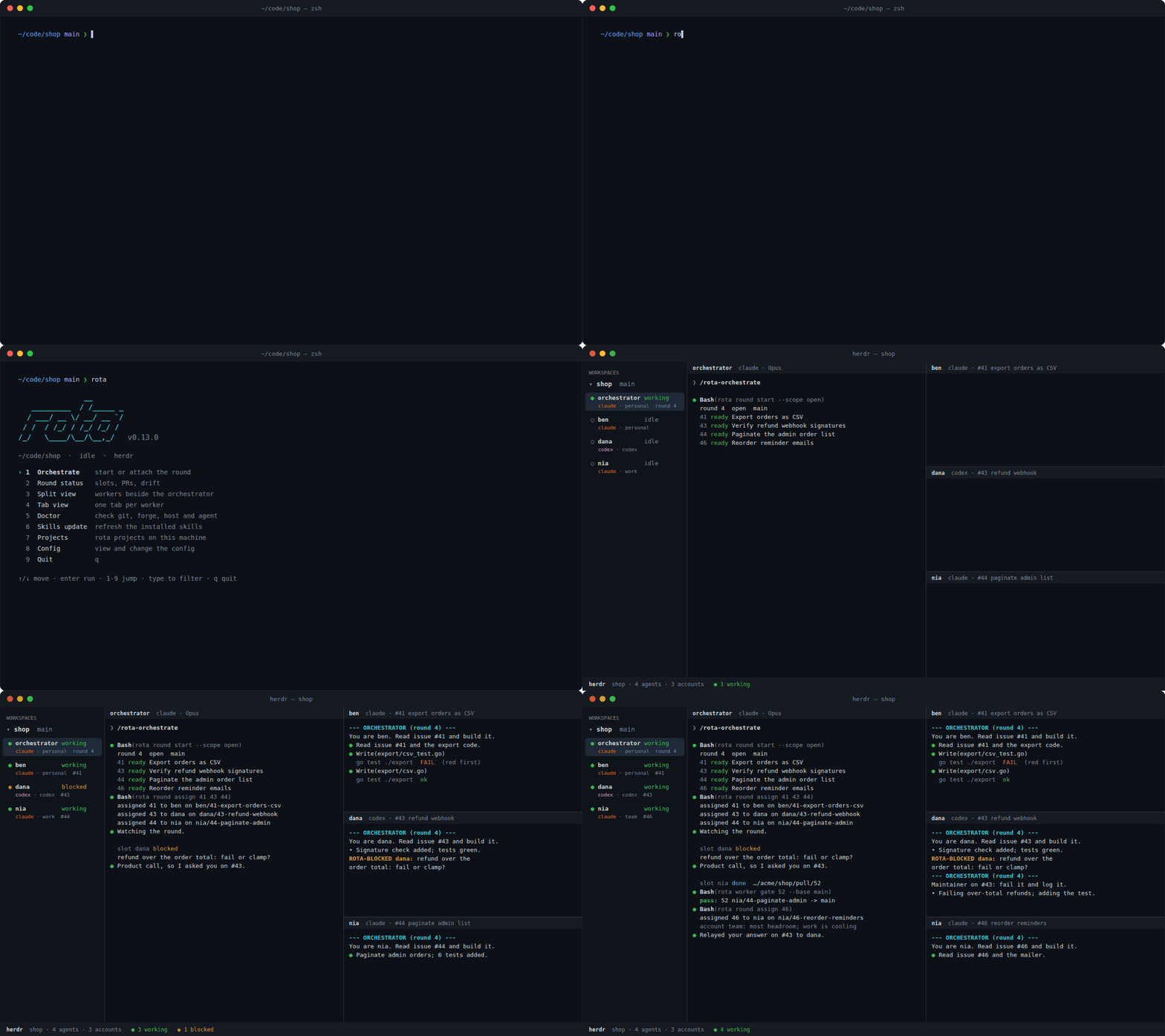
Your first round sets it up step by step. You'll want gh or glab, and herdr or tmux.
Runs in your terminal
A round runs in your terminal, not in a cloud dashboard. Every worker gets its own tab, so you can watch any agent, or type into one, at any time.
- herdr reports each agent's state directly (working, blocked, done), and rota waits on those events instead of polling.
- tmux works too: rota reads the panes to tell what each worker is doing.
- Neither? The round still runs, with workers as subagents of the orchestrator.
Several accounts, balanced
Long rounds run into usage limits. List your accounts and rota spreads the work and routes around limits.
- New work goes to the Claude account with the most headroom and skips one that is cooling down.
- When a worker hits a limit, its issue moves to a free slot on another account and continues from the pushed branch.
- The orchestrator hands off and restarts under another account before it hits its own limit.
Problems this fixes
| What goes wrong | What rota does |
|---|---|
| Agents start building before the task is clear. | /rota-brainstorm and /rota-plan settle it first. |
| A session ends and the next one starts blind. | .rota/ and /rota-pause carry state across. |
| Parallel agents collide or merge red. | Each gets a worktree, and the gate tests the merged main. |
| Lessons get lost. | /rota-learn and /rota-decide keep them where the next session reads them. |
A memory that lives in the repo
Both ways of working share .rota/, committed next to your code, so a fresh session picks up where the last one stopped.
.rota/
├── KNOWLEDGE.md    what the project has learned
├── DECISIONS.md    the lines it must not cross
├── BACKLOG.md      items, or your GitHub/GitLab issues instead
├── MILESTONES.md   the bigger picture
└── handoff/        notes for the next session
The .rota/ folder lists every file.
See how the skills chain
Three common situations, each a short chain of skills. Pick one and step through what each skill prints.
One clear item, small enough to build in one sitting.
Step 1 of 3 Write the item down. Capture records it and stops.
[B03] list shows every row when the limit is zero Bug, P2
Use when the user brain-dumps work, says “capture”, “add to backlog”, “note this bug”, “/rota-capture”, or describes a problem without asking for an immediate fix. Also use on “remove [B07]”, “delete this entry”, “drop this item” to delete captured items. Use --triage <N> on a tracker issue filed by someone else. All about /rota-capture
Step 2 of 3 Build it in small commits. The proof gate needs a red run, then a green one.
Tree clean. Branch rota/B03-limit-zero created.
T1  treat 0 as a real limit in cmd/list.go
    rota proof record B03 -- go test ./cmd -run TestListLimitZero   FAIL (red run)
    rota proof record B03 -- go test ./cmd -run TestListLimitZero   PASS
a1b2c3d fix: treat --limit 0 as zero rows [B03]
Use when backlog items already exist and need implementation (“implement 42”, “build these”, or “implement [B07]” on the file backend), or with no argument to reconcile active work and pick the next item. A parallel round with standing workers is /rota-orchestrate, not this skill; an item not yet captured goes through /rota-capture first. All about /rota-work
Step 3 of 3 Review the branch, then open the PR or merge.
/rota-review: PASS
PR body built from commit subjects and resolved IDs: B03
Merged into main with --no-ff; branch deleted.
Use on “ship it”, “open the PR”, “finish this branch”, or when work is done and ready to integrate. Use –undo on “roll back the last cycle”, “revert that merge”. All about /rota-ship
Something is broken and the cause is not known yet.
Step 1 of 3 Reproduce it, test one hypothesis at a time, fix it in one commit.
Reproducer: TestAmountRoundTrip FAILED (0.10 -> 9, want 10)
H1 (likely): the minor-unit helper multiplies a float64 by 100 and truncates.
Verified H1: the intermediate float prints 9.999999999999998.
Fix: decimal Shift(2) instead of Float64() * 100. Reproducer passes.
fix(money): use decimal.Shift instead of Float64 for minor-unit conversion
Root cause was non-obvious. Consider running /rota-learn to capture this.
Use on “debug 42” or “debug [B07]” on the file backend, “why is X broken”, “investigate the crash”, or when a bug needs a proper cycle rather than a one-shot fix. All about /rota-debug
Step 2 of 3 Review and merge the fix.
/rota-review: PASS
PR body built from commit subjects and resolved IDs: F04
Merged into main with --no-ff; branch deleted.
Use on “ship it”, “open the PR”, “finish this branch”, or when work is done and ready to integrate. Use –undo on “roll back the last cycle”, “revert that merge”. All about /rota-ship
Step 3 of 3 Keep what the bug taught you for the next session.
Proposed bullet under ## Money & Decimals:
Never multiply a decimal.Decimal by a float to convert to minor units. Float64() * 100 gives 9.999... for 0.10, and truncation gives 9. Use decimal.NewFromString(...).Shift(2).IntPart() end to end.
Written to .rota/KNOWLEDGE.md.
Use at the end of a session that surfaced reusable knowledge, after a correction-rich debugging arc, or on “save what we learned”, “capture this learning”, “/rota-learn”. All about /rota-learn
A few independent issues are ready and you can stay around for questions.
Step 1 of 5 Shape the slate so every issue has clear acceptance.
Planning dial: 2 (spec) - new flag on a published command; revert is clean. Override: say "level 1" or "level 4".
Goal: export --since DATE keeps only rows on or after DATE.
T1. Parse and validate --since in cmd/export.go (AC-1).
    Verify: go test ./cmd -run TestExportSince
T2. Document the flag in docs/usage/export.md (AC-2).
    Verify: grep -n -e --since docs/usage/export.md
Confirm this plan? (yes / changes)
Use when an item or milestone slice is too big to one-shot, or when alignment matters before code lands, or on “plan 42”, “write a plan for this”. All about /rota-plan
Step 2 of 5 Hand issues to workers, review their PRs, merge through the gate.
rota round start --scope slate --items 42,51,58,63
rota round assign 42   # claims #42, cuts <agent>/42-<slug>, starts a worker
...
Armed rota round watch in the background; it wakes me on a slot, PR or escalation change.
Use on “you are the orchestrator”, “run a round”, “orchestrate”, “assign the next issues to the workers”, “what are my workers doing”. All about /rota-orchestrate
Step 3 of 5 Answer the decisions the round put to you, one at a time.
1 of 3: slot nia is blocked on #58.
Worker asks: keep the old --json shape or break it?
A) Keep the old shape (recommended)
B) Break it and note it in the changelog
C) Write your own answer
Recorded as a decision comment on #58 and relayed to nia.
Use only when the maintainer types “/rota-answer” during a round. The orchestrator points the maintainer to it when two or more decisions wait; it never starts it. All about /rota-answer
Step 4 of 5 At wind-down, keep what the round learned.
Read the round summary: #58 bounced twice on the same criterion.
Proposed bullet under ## Rounds:
A criterion with two readings produces the same wrong PR on every bounce. Audit the acceptance criteria before the third relay.
Written to .rota/KNOWLEDGE.md.
Use at the end of a session that surfaced reusable knowledge, after a correction-rich debugging arc, or on “save what we learned”, “capture this learning”, “/rota-learn”. All about /rota-learn
Step 5 of 5 Cut a release when the work adds up to one.
Checklist (.rota/RELEASE.md): all items pass.
Commits since v0.25.0: 1 feature, 4 fixes. Recommend minor.
Release notes drafted for v0.26.0.
Notes look good? Yes pushes the tag and publishes the release. (manual gate)
Use on “release”, “cut a release”, “tag a release”, “ship X.Y.Z”. All about /rota-release
Every skill, by stage
- Capture
/rota-capture- Maintenance
/rota-init/rota-bugreport/rota-release
Works with
- Agent harnesses
- Claude Code
- Codex
- OpenCode
Mixed in one round
- Forges
- GitHub
- GitLab
- Local
GitLab self-hosted too; local merges directly
- Issue sources
BACKLOG.md- GitHub Issues
- GitLab Issues
- Jira
- Linear
- It's a Plan
- Terminal hosts
- herdr, tmux
- Platforms
- Linux, macOS, Windows through WSL2
Start with one item
Paste the prompt at the top of this page into your coding agent, or install by hand:
brew install l4ci/tap/rota
rota skills install
cd your-project && rota setup